Pattern Dataset
The PatternDataset is a the core of most SizedDataset implemented in Plums dataflow.
It is a hybrid class which offers enough modularity to cover the majority of use cases a data scientist might encounter
while automating most of the boilerplate machinery involved in a Dataset implementation.
It does so with 2 features:
Tile files and annotation file(s) are looked up on the file system with a glob-like mechanism following constraints provided in the form a special micro-language.
Actual file reading and parsing is delegated to user provided functions which are called drivers and take care of creating Plums data-model compatible objects.
Walkthrough: The Playground dataset
Because a picture is worth a thousand words, it’s best we start with a simple example. We assume a dataset which have the following structure:
datasets
├── <dataset_id_1>
│   ├── samples
│   │   ├── <zone_id_1>
│   │   │   ├── <image_id_1>
│   │   │   │   ├── <sample_id>.jpg
│   │   │   │   └── ...
│   │   │   ├── <image_id_2>
│   │   │   │   ├── <sample_id>.jpg
│   │   │   │   └── ...
│   │   │   └── ...
│   │   ├── <zone_id_2>
│   │   │   ├── samples
│   │   │   └── ...
│   │   └── ...
│   └── labels
│       ├── <zone_id_1>
│       │   ├── <sample_id>.json
│       │   └── ...
│       ├── <zone_id_2>
│       │   ├── <sample_id>.json
│       │   └── ...
│       └── ...
├── <dataset_id_2>
│   └── ...
└── ...
Well knowing readers might recognise the Intelligence Playground
export structure for which a PlaygroundDataset class is already provided in Plums, but for the sake of
comprehension, we will walk through its base implementation again.
Manually walking such a structure and matching related tile and annotation files is a tedious and error-prone task but
the PatternDataset class can do it for us given we provide it with a correct path pattern pair.
Path patterns
The path pattern for annotation files would look something like this:
datasets/{dataset_id}/labels/{zone_id}/{sample_id}.json
Let’s break it down to understand what it means:
Every path pattern are path-like strings which acts a template to glob and capture compatible file paths. As for regular paths, a path pattern can be either absolute or relative.
The first part (i.e. datasets) defines a rigid match. It is called a component and it means that, for a file
path to match the pattern, they need to start with a datasets folder.
The second element (i.e. {dataset_id}) defines a loose match. It is called a named group or simply group
and it means that, for a file path to match the pattern, they must have a folder subsequent to datasets which can
be called anything. For example datasets/ae125f13de31a/ would match datasets/{dataset_id}, as would
datasets/some-folder.
The next two element are respectively a component and a group and behave as before. The last part, however is
special, as it must match a file and not a folder as before. Every path pattern must end with a file
match to be valid, it may, however, be either a group or a component match. Some flexibility is possible for
extension matching, for example, if someone mixed up *.json and *.geojson files for annotation, we could add
alternative extension with the .[~|~] syntax, in our example this would yield {sample_id}.[json|geojson]
as the last pattern element.
As above, the path pattern for tiles could be something like:
datasets/{dataset_id}/samples/{zone_id}/{image_id}/{sample_id}.jpg
Notice how we used the same group names for related groups. This is important because the contents of
named group matches will be used in a latter part to associate tiles with annotation files. As they are no limits
to the number of files in a pair association (e.g. a tile/annotation “pair” could comprise of 10 images and 25 json
files for example) but each and every associations must yield a single DataPoint, one has to be careful to ensure
that the group names and locations in the patterns guarantee relevant pairs.
It is also possible to provide regular expressions to named groups in order to narrow the search and avoid dubious
matches in cluttered file systems. For example, in the case of the Playground dataset, every dataset, zone ids are
uuid4() identifiers, for which an extensive regex is
[0-9a-f]{8}-[0-9a-f]{4}-4[0-9a-f]{3}-[89ab][0-9a-f]{3}-[0-9a-f]{12}. We could provide this extra information in the
path pattern by appending the regex to the named groups’ name separated with a ‘:’,
as {dataset_id:[0-9a-f]{8}-[0-9a-f]{4}-4[0-9a-f]{3}-[89ab][0-9a-f]{3}-[0-9a-f]{12}}.
A (very) strict pattern for tiles could then look like:
datasets/{dataset_id:[0-9a-f]{8}-[0-9a-f]{4}-4[0-9a-f]{3}-[89ab][0-9a-f]{3}-[0-9a-f]{12}}/samples/{zone_id:[0-9a-f]{8}-[0-9a-f]{4}-4[0-9a-f]{3}-[89ab][0-9a-f]{3}-[0-9a-f]{12}}/{image_id}/{sample_id:[0-9a-f]{32}}.jpg
We can then create our dataset by instantiating a PatternDataset with the path pattern we made above:
from plums.dataflow.dataset import PatternDataset
dataset = \
    PatternDataset(tile_pattern='datasets/{dataset_id}/samples/{zone_id}/{image_id}/{sample_id}.jpg',
                   annotation_pattern='datasets/{dataset_id}/labels/{zone_id}/{sample_id}.jpg',
                   tile_driver, annotation_driver,
                   path='/path/to/dataset/root')
Although the dataset we define is now able to discover valid tile/annotation pairs in /path/to/dataset/root, it can
not open any file and create DataPoint yet. To do so, we must provide it with a pair of appropriate drivers.
Drivers
A driver is not a type of object, but rather a convention.
It designates a function (a callable) which is called for each data points to open the file paths found by the
PatternDataset and construct valid Plums objects.
They can be seen as a sort of hook system to allow file handling customisation in the dataflow.
To explicit the idea, in a nutshell, the PatternDataset has the following workflow:
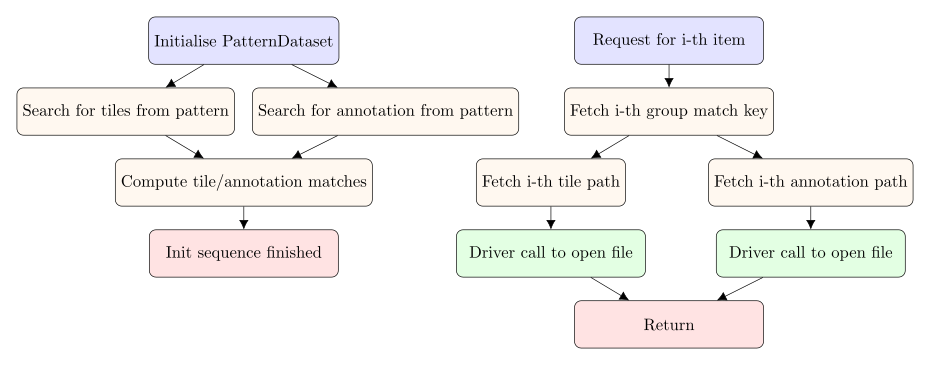
Because the PatternDataset has no idea of how to handle user files, it delegates its actual handling to a
user-provided callable (in green in the diagram above).
In our case, tiles are simple jpeg images which we can open using the Tile helper provided in Plums
dataflow:
from plums.dataflow.io import Tile

def tile_driver(path_tuple, **matches):
    tiles = [Tile(path) for path in path_tuple]
    ...
However, for our driver to be usable in a PatternDataset, it must return an entity which follows the Plums
data-model. For tiles, it must be an OrderedDict-like entity, like a TileCollection:
from plus.commons.data import TileCollection
from plums.dataflow.io import Tile

def tile_driver(path_tuple, **matches):
    tiles = [Tile(path) for path in path_tuple]
    return TileCollection(*tiles)
Annotations are a bit trickier and require more work to create Plums objects.
They are stored as a FeatureCollection where one feature represent
the zone footprint in the tile, and the others, actual records. This means that, we should first parse the underlying
JSON file (with the load helper function), stream through the features entry and accumulate records on the
fly.
We will discard the zone footprint mask in this example to keep it simple but we might as well have stored it in a
VectorMask as the actual PlaygroundDataset does.
from plums.commons.data import Annotation, RecordCollection, Record
from plums.dataflow.io import load

def annotation_driver(path_tuple, **matches):
    path = path_tuple[0]  # We expected a single annotation JSON file

    feature_collection = load(path)  # Parse the JSON file

    record_collection = RecordCollection()
    for feature in feature_collection['features']:  # Stream features to find records
        # If it has a 'mask' property, it the zone footprint
        if 'mask' in feature['properties']:
            continue  # Ignore it

        # Fetch relevant information
        coordinates = feature['geometry']['coordinates']
        labels = feature['properties']['tags']
        confidence = feature['properties'].get('confidence', None)

        # Create Record
        record = Record(coordinates, labels, confidence)
        record_collection.append(record)

    # Return Annotation
    return Annotation(record_collection)
Full solution
We are now ready to re-create the PlaygroundDataset from scratch with a PatternDataset putting everything we have
seen before together:
from plums.commons.data import Annotation, RecordCollection, Record, TileCollection
from plums.dataflow.io import Tile, load
from plums.dataflow.dataset import PatternDataset

def tile_driver_fn(path_tuple, **matches):
    tiles = [Tile(path) for path in path_tuple]
    return TileCollection(*tiles)

def annotation_driver_fn(path_tuple, **matches):
    path = path_tuple[0]  # We expected a single annotation JSON file

    feature_collection = load(path)  # Parse the JSON file

    record_collection = RecordCollection()
    for feature in feature_collection['features']:  # Stream features to find records
        # If it has a 'mask' property, it the zone footprint
        if 'mask' in feature['properties']:
            continue  # Ignore it

        # Fetch relevant information
        coordinates = feature['geometry']['coordinates']
        labels = feature['properties']['tags']
        confidence = feature['properties'].get('confidence', None)

        # Create Record
        record = Record(coordinates, labels, confidence)
        record_collection.append(record)

    # Return Annotation
    return Annotation(record_collection)

playground_dataset = \
    PatternDataset(tile_pattern='{dataset_id}/samples/{zone_id}/{image_id}/{sample_id}.jpg',
                   annotation_pattern='{dataset_id}/labels/{zone_id}/{sample_id}.jpg',
                   tile_driver=tile_driver_fn, annotation_driver=annotation_driver_fn,
                   path='/path/to/dataset/root')