 Model Format specification
The Plums Model Format (PMF) is a content-agnostic format to save model in a semantically-rich and standardized manner.
It consists in two parts:
A Metadata.yaml file which describes the way a model was produced, and a summary of its apparent content.
A Tree structure which stores semi-arbitrary data in a semantically-rich manner to allow for easy and consistent analysis of a given model content across producer.
Note
The PMF specification describes a minimum specification. That is to say that it may be freely extended although consumer should not expect any PMF-foreign elements to be present in any valid PMF model.
Tree structure
Note
In the rest of this page, files named as <name> are content agnostic and may contain anything the
producer/consumer pair may need.
A PMF model is characterized by its minimal filesystem tree structure :
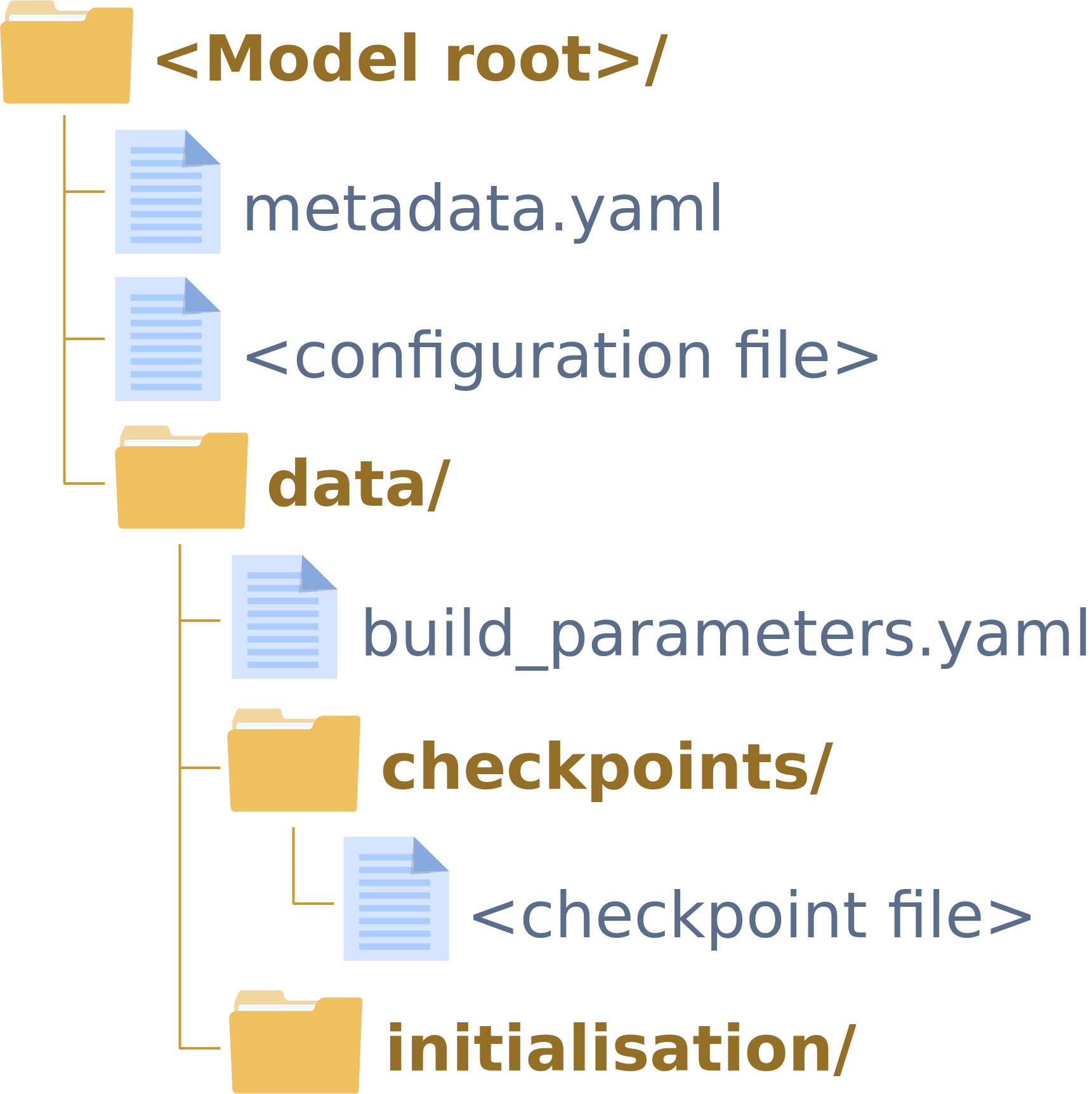
Where:
metadata.yaml (yaml): The main PMF metadata contains most of the information used to construct a valid PMF model. For more information on how to construct a valid PMF metadata file, see Metadata.yaml.
<configuration file> (Any): The producer configuration file used to train the model. It may be of any form, format or content.
build_parameters.yaml (yaml): Optional
key:valueparameters that a producer might store alongside a PMF model for the consumer to use.<checkpoint file> (Any): Any file used to store any checkpoints. It may be of any form, format or content, and it is up to a particular producer/consumer pair to know how to open it.
The initialisation/ folder contains information on any prior data the model was initially based on. If it is empty, the underlying assumption is that the model was trained from scratch.
If it contains a PMF-like tree (i.e. a PMF tree with no checkpoints/ folder), the underlying assumption is that the model was trained based on a previous PMF model, e.g.:

If it contains a single file (of any form, format or content), the underlying assumption is that the model was trained based on a previous model checkpoint, e.g.:

The <model root>/ and data/ folders may contain additional files.
Metadata.yaml
The metadata.yaml file encode various standard information in a dictionary-like key:value form.
Specification
It is made of two sections:
A
Formatsection which documents the stored PMFModelformat production, i.e.:A
Modelsection which documents the stored PMFModelcontents.
The Model section is itself made of various metadata and two sections:
The model
name.The model
id.A
Trainingsection which documents metadata on the modelTrainingi.e.:The training status (i.e. pending, running, failed or finished).
The training start (Epoch number and timestamp).
The training latest known epoch (Epoch number and timestamp).
The training end (Epoch number and timestamp).
A
Checkpointsection which documents registered modelCheckpointCollection.
A
Initialisationsection which document the modelinitialisation.
The Checkpoint section is a mapping between a Checkpoint reference
(its name) and its
epoch and path. That
is to say that each Checkpoint will be registered in the metadata as:
reference:
    epoch: int
    path: <path-to-checkpoint-file>
    hash: <checksum-of-checkpoint-file>
The Initialisation may take any of those three forms:
A
nullvalue if the PMF model has no initialisation.An
InitialisationPMFsection documenting a PMF model used as initialisation i.e.:pmf: name: <name-of-pmf-model> id: <id-of-pmf-model> path: <path-to-pmf-like-model-tree> checkpoint: <reference-to-pmf-model-checkpoint-used-as-initialisation>
An
InitialisationPathsection documenting a model checkpoint used as initialisation i.e.:file: name: <name-of-checkpoint> path: <path-to-checkpoint-file> hash: <checksum-of-checkpoint-file>
Example
format:
    producer:
        name: faster_rcnn
        version:
            format: py_pa
            value: 0.4.0
    version: 1.0.0
model:
    name: model_name
    id: 3d6acb1fce4469ee1559ba16e02f922f
    configuration:
        hash: 43ccb8cd86048450e11a26b472d5efd0
        path: model_configuration.py
    initialisation:
        file:
            hash: a268eb855778b3df3c7506639542a6af
            name: imagenet
            path: data/initialisation/resnet_weights_tf_dim_ordering_tf_kernels_notop.h5
    training:
        checkpoints:
        1:
            epoch: 1
            hash: b4975f62e007d54a55f53b44a367d998
            path: data/checkpoints/1.h5
        10:
            epoch: 10
            hash: 9d03a4a7455829da47c1c346eb17ddb1
            path: data/checkpoints/10.h5
        12:
            epoch: 12
            hash: 01afa021fdf47b609decd434755c06f6
            path: data/checkpoints/12.h5
        end_epoch: null
        end_time: null
        latest: 12
        latest_epoch: 12
        latest_time: 1552481973.357268
        start_epoch: 0
        start_time: 1552464823.166782
        status: running
Glossary
- model
A model reference the concept of model in general, independent on how they are stored. As such, it might reference a
Modelinstance which is an accepted representation of a model.- producer
A producer is a piece of software which is responsible for creating and modifying a given model.
- consumer
A consumer is a piece of software which is responsible for interpreting and manipulating a model without modifying its content.